Sunday, October 27, 2013

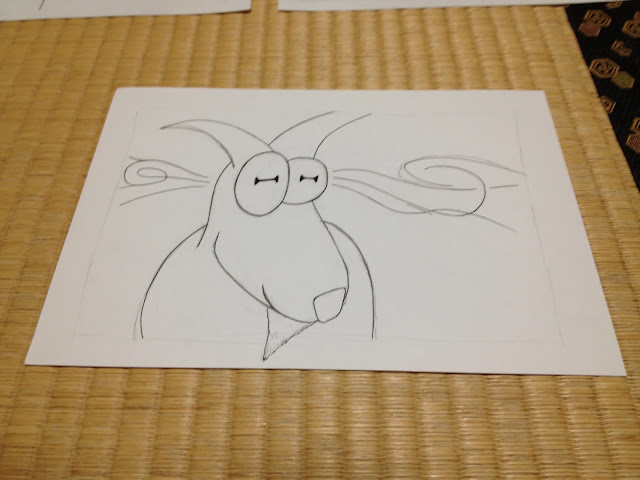
ひとりゴート Ink Progress


Well this is my haul from inking this weekend. I'm just shy of finishing half of the pictures. I may tweak these here and there, but this is basically it. There are ten pictures here, but two of them are on the backs of others. I did a test scan to see how nicely that would play with my scanner and it does bleed through a little, but I fixed it with almost no effort by shuffling contrast and brightness bars. So for these black and white scans it definitely won't be a problem. I'm thinking that it won't bleed through at all after I do the crayons, but the worst case scenario would have me redrawing two pictures. A slight pain in the butt. Far from the end of the world.

Mid-ink thoughts--I expected to get tired of drawing goats while working on this book, but that hasn't been the case. It's the grass. I'm tired of drawing grass. So much of it. I like the look of it and all, but my hand is killing me.

I haven't got a strict deadline for this book, but I want to finish soon so I can work on other projects. I'm still considering my options on how to publish. Going to try traditional publishing first and if that doesn't pan out, I'll try print on-demand with crowd funding. Making it an eBook would be a last resort. Since it's drawn in landscape, I think it would look terrible on most e-readers.

Inks should be done by the end of the week. I leave for a vacation in Hawaii on Saturday and when I come back I want to be doing the crayons. There's a big touch panel expo coming up that my company is going to have a booth at though. Overtime might limit my output this week. Here's hoping it doesn't.

Cheers, ya'll!

Group shot minus the ones on the backs. Below you'll find pages 1-10 all in order.


Sunday, October 20, 2013

Writing Resources to Sharpen your (S)words


Not long ago at a convention-esque 40k event I met Steve Parker, one of the writers for Games Workshop's Black Library publishing house. He was a very friendly and encouraging guy. When he gave me some advice on resources for honing my writing skills, I was excited and keen to lose more sleep to this part of my life than I already do.

There were essentially two resources that he recommended to me. The first is the Writer's Digest Elements of Fiction series. Each of those books was written by a different author and focuses on a specfic area of writing fiction. The one I'm reading first is Orson Scott Card's Characters & Viewpoint. I'm about a third of the way through it despite being hopelessly transfixed by A Storm of Swords. So far it seems pretty good, but it's hard to say much about it without finishing it and trying some of Card's methods. The best of it so far has been about knowing the needs of your story and asking a lot of questions. I hope to finish this one around the time I finish my current picture book project. I won't be starting the next picture book until around January and in between I'm going to write some short fiction.

The second resource is an online writers' workshop called Critters. At first I thought to sign up for the time being and then come back to it when I have a story I want critiqued. As it turns out, however, once you register you have to critique a story each week to maintain membership. Oops. I signed up prematurely, but that's really for the best. Procrastination is less than worthless. I've done a month's worth of critiques so far. Each week it is easier to identify and describe what I feel is wrong. Just as importantly, it's easier to say what I think could fix it. I even reread a story I wrote four years ago. I looked at it through fresher, more critical eyes and saw ways to write it how I had originally intended to.

Steve Parker told me that the value in a workshop group is really in being able to identify and communicate what is wrong with stories that don't work for you. After doing this for even a little while I can see how true that is. I am still looking forward to getting some of my work critiqued, however, because I've been reading some of the other critiques that get posted and there is a lot of very good advice given for each story posted. I strongly recommend giving this a try if you are anything as isolated from other writers as I am here in the mountains.

Happy writing and happy critting to you!

Tuesday, October 1, 2013

Bear with Me, Both English and Japanese, Now Available

I posted about Bear with Me on my 40k blog, but this is the first time for me to mention it over here. Well, Bear with Me and ぼくはクマのスナッフル are both finally available through Smashwords and Amazon. They are also both finally approved for distribution to Apple, Sony, Kobo and Barnes & Noble. I just gave it a search through iBooks and saw that it's been delivered. I got wonderful feedback from my test readers and their children. If you've got a child then you may have same endless need for good picture books that I do. Or, if you simply would like to show support for my work, please give it a download and review it on Goodreads. I've been doing my best to introduce my work to people through the net, but truly, nothing beats word of mouth and any help to spread the word is beyond appreciated.

Bear with Me
Smashwords
Amazon


ぼくはクマのスナッフル
Smashwords
Amazon

Monday, September 23, 2013

Figure Drawing Resources: Loomis and Bridgman


I just heard a name that will probably change drawing for me much more than I can even know just yet: Andrew Loomis. I have a feeling I should have known who he was years ago, and would have if I'd majored in art. Apparently he was a brilliant writer, illustrator and art instructor before WW2. Even Alex Ross looks up to an draws inspiration from him according to one of the Amazon reviews I read.

What's better than all that is that just before I ordered some overpriced copies of his two seminal works, I found a website that links to *gasp* legit free downloads of not only his work, but also many of the other "best figure drawing guides" that people were recommending online.

Here is the link: Process Junkie - Best Figure Drawing Books Ever
Edit - here's a link that isn't broken: Illustration Age

I can't wait to get into these books. What an exciting find!

Tuesday, September 17, 2013

Decisions, Decisions: Which Wacom Tablet is Right for You?


Lately I have been doing a lot of reading on Wacom's drawing tablet products. I knew I wanted to improve on how I'm digitizing my work, but I wasn't sure how. For the longest time I just assumed that professional quality drawing tablets are completely out of my price range and so I wrote them off altogether. Well, for whatever reason I took a second look at them and it turns out they're only *almost* out of my price range. It really depends on what I want to be able to do, as Wacom sells a number of products designed for different budgets and needs. I've nearly decided what I am saving to buy and I'd like to share what sort of thinking went into my decision making process.

Why Wacom?
What is so special about Wacom you ask? In one word, digitizers. I don't know how their technology works exactly, but their tablets sport 2,048 levels of pressure sensitivity these days. They also support tilt sensitivity, are incredibly accurate and have satin textured screens that feel like paper. There are other brands out there with some of these features and I have heard good things about many of them, but it seems none have the whole package. The consensus among professional illustrators is that Wacom does it best, but at a price.


Drawing on the Screen vs. Drawing on a Pad
Once you have decided on Wacom, this is, as a friend pointed out, the first decision to make. If you don't mind looking at the screen while you draw with your stylus on a pad (which is exactly how we use mice), then you can save over $800. Wacom's Intuos line of digitizers are excellent from what I have heard, but I didn't consider this option terribly closely. Otherwise I would have more to say about these apparently fantastic tools. I know what I want at a minimum and that is to draw on the screen. Being stubborn on this point will cost me.

Cintiq: Small, Large and Multi-touch
If you fantasize about drawing directly into Photoshop the way I do, then the Cintiq may be for you. This line of products is much more expensive, but they have a wonderful reputation in the digital art community. To start with I looked at the 22" multi-touch model, but very quickly I realized that it would be a $2,500 convenience if I intended to be mostly working in PS. So then I looked at the 22" Cintiq HD which is $500 cheaper. And then I looked at the size of my already cluttered desk. That was when I asked myself a simple question that I should have started with: how much drawing space do I really need? That lead me to YouTube where I watched videos of people painting on the 13HD. I noticed that the screens they were drawing on still looked pretty big. The ability to zoom and move the image also reduces some need for a large screen. At $1,000 it was also by far the cheapest option available. But two things nagged me incessantly in the back of my mind: 1) no battery, so it is always connected by a cable everyone says does not plug in firmly enough and 2) it's just so close to being a tablet PC that I wished it could be unplugged for use on the go.


A New Challenger (or two, actually): The Cintiq Companion and Companion Hybrid 
I brought this up to my coworker and he asked me why I don't just get the 13" tablet PC they're releasing this year. Much to my surprise, it turned out they're releasing two with two varieties each. One is a Windows 8 tablet and the other runs Android Jelly Bean 4.2. Both products support multi-touch, have 13.3" screens and all the same features that come with the Cintiq HD13. At first I was drawn to the Win8 tablet because it would be able to run full versions of dedicated art applications. But reading further, I found out that it can't plug into a PC and function as a standard Cintiq whereas the Android tablet can. Essentially that was the deciding factor, even besides the higher cost of the Windows device (128GB at $2,000) and the low internal memory of the Android one (16GB at $1500). I don't want to find myself wishing I could upgrade my hardware later on, or wishing I could work on my PC without having that option available. There are some good hands-on product reviews out there, like this one. I recommend reading more (a lot more) if you're considering one of these specialty products.

Not the Verdict, but my Verdict
Any choice on hardware like this needs to be tailored to the needs of the user. All of these products have good and bad points to them from what I have found, but only two suit my needs and means. Right now I am looking very closely at the 13HD and the Companion Hybrid and I'm leaning toward the Hybrid. That size is just right for me since I tend to work with traditional media that's smaller than that anyway (actually much of my painting experience comes from painting 28mm scale models. The details are unbelievably tiny). The issue now is whether having a stand-alone Android tablet warrants the extra cost. Knowing me I will probably prefer to work at home with it and use proper PC apps rather than the mobile apps available on Android. On the other hand, I also know I will regret it if I don't have the option to unplug and sketch on the go.

No one else can say what's right for you and your work. The best that you can do is to ask yourself the right questions and determine what suits your means and needs. Here are the questions I have asked myself:


  1. Do you need to be able to draw on the screen. No? Congrats you just saved a lot. Buy an Intuos.
  2. If you answer to #1 is yes, then is a 13" screen sufficient? Yes? The 13HD may be right for you. Move on to the next question. No? Have a look at the bullet point.
    •  If you really need a 22" or 24" screen, the last question is whether or not you need multi-touch to make your art.
  3. Do you need the portability of an independently functioning tablet PC? No? You just saved money! Get the 13HD. Yes? Bullet point below.
    • If you need portability there are the two different tablets, one with Android (Companion Hybrid) and one with Win8 (Companion). If you want to use it on a home PC too like a normal Cintiq then the only option is the Hybrid. If you want to use full-fledged creative suites while on the go, then the only option is the Companion. There are different memory sizes, but for the huge costs involved, I would recommend getting a separate micro SD card and/or an external hard drive.

And that's that! There's a very simple flow chart in that list, but I'm not able to put it together right now. Maybe another time. Happy shopping! Or in my case, constantly refreshing the Wacom products page while I daydream about when I can finally get one.


Friday, September 13, 2013

ISBN Follow-up and Publishing Weekend


Today I finally received my international book numbers! At first I didn't see them in this booklet they sent me, but luckily I found them before I set about actually reading the whole thing. From what I've read in it, there is a lot of information I already learned in English and I expect there is far more information I just don't really need. I've had to read longer, drier manuals than this for my work, but I still don't relish the thought of wading through a hundred pages of bureaucratic Japanese.


Really dodged a bullet on this one. This looks unbearably boring.
Anyway, I thought before I get to finalizing my first book's publication, I'd do an update on the rest of the application process that came after I filled out the internet form. Actually, let me back up just a little bit. To even get the form I had to apply to apply, as strange as that sounds. They sent a URL to my email address and I had 96 hours to complete that and send it in. After I sent their form back (the one I wrote about last time) I received an email with that information in a PDF. That had to be printed, signed and a copy of the receipt for the bank transfer they requested needed to be glued to it. Then I mailed it to their office in Tokyo.

A few days later I got a phone call while I was at work. When I called them back, they said they had called the house, but that no one was home. They needed to ask something that they wouldn't ask me unless I was on my home phone and so I asked them to call the next day. Then I had my wife call them since she had plans. Again, they just need to ask a few questions and they scheduled something for the next day. Well, the next day finally comes and they forgot to call. When Haruna called them, it turned out they just wanted to verify our home phone number. Bureaucracy at its finest.

That turned out to be the last actual hurdle. I was finally waiting on them to process my request. They said it would take up to three weeks, but it only took about two. Maybe a little less than that. I don't know if I might come across some other snags this weekend, but if not then I'll post again when I have the book up for sale. My hope is to have both the English and Japanese versions out this weekend. This has been a neat first adventure and I'm glad to have been able to share it with you. I'll be looking forward to the others that will follow.

Wednesday, August 28, 2013

Getting Started with ISBNs

Last night I applied for international standard book numbers through the Japanese ISBN agency. Truth be told, I didn't even realize these were a thing you apply for. I don't believe there is a rejection system in place, barring errors in the information you give them; still, I had expected it to be more like a toll gate where you fork over the money and they let you through. There were a lot of surprises as I made my way through this process and I thought I'd share some of what I learned.

Before I'd started I had no idea what an ISBN is. I had seen the letters on the back covers of books, but never thought about it. An ISBN, as it turns out, is a unique serial number that identifies the book. That's it. Since more than one book might have the same name, or perhaps very similar names, ISBNs are used to identify books precisely.

If publishing, do you really need an ISBN? That depends on how and what you're publishing. Here you can find a PDF which lists the media that ISBNs can be attached to. In my case, I want to put one on my eBook. I don't actually have to, but there are some eBook retailers that do require them (namely Apple and Sony). In order to distribute my work through them I need the numbers.

Getting the codes has proved somewhat complicated. Like I said, I thought I'd just hand over some money and be done with it, but the first sign that it wouldn't be so easy was not finding a field for "country" in the address form on Bowker's website. That had me searching on Google to find out that ISBNs may be international, but they are administered locally. The participating countries each have their own agency that processes inquiries for publishers whose business are stationed in their locality. There is only one agency for each country and ISBNs can only be issued by official agencies. I didn't happen to turn up any scam sites, but I can't imagine they don't exist.

I had a lot of questions when I first started. Can Japanese ISBNs be used for works distributed world-wide? Do you need to attach seperate codes to foreign language editions? Can ISBNs be transferred or sold? There are answers to almost every conceivable question in various FAQs that can be found around the net, including herehere, and here.

There are a few last details worth mention. The information required by the ISBN agency includes an address and land line phone number in the country over which they preside. I also needed to enter the name of the publisher and its legal business status. This cannot be changed once registered with them. I haven't established an official business, as I have yet to look into my options regarding registering here in Japan or in the US. In any case, this means deciding on a name that will appear in the official records before doing business. I have chosen Stern Publishing. It sounds official and the tag-line is just too good to pass up. Stern Publishing: we're serious about books. I crack myself up...

I have a file to mail back to the agency and then it's back to waiting. Fifteen business days according to their email, so unless there are any other snags, it looks like I can publish Bear with Me around the middle of September.